
By using this site, you agree to the Privacy Policy and Terms of Use.
Accept
TechgoonduTechgoonduTechgoondu
  • Audio-visual
  • Enterprise
    • Software
    • Cybersecurity
  • Gaming
  • Imaging
  • Internet
  • Media
  • Mobile
    • Cellphones
    • Tablets
  • PC
  • Telecom
Search
© 2023 Goondu Media Pte Ltd. All Rights Reserved.
Reading: Goondu DIY: building your own digital music system
Share
Font ResizerAa
TechgoonduTechgoondu
Font ResizerAa
  • Audio-visual
  • Enterprise
  • Gaming
  • Imaging
  • Internet
  • Media
  • Mobile
  • PC
  • Telecom
Search
  • Audio-visual
  • Enterprise
    • Software
    • Cybersecurity
  • Gaming
  • Imaging
  • Internet
  • Media
  • Mobile
    • Cellphones
    • Tablets
  • PC
  • Telecom
Follow US
© 2023 Goondu Media Pte Ltd. All Rights Reserved.
Techgoondu > Blog > Mobile > Cellphones > Goondu DIY: building your own digital music system
Audio-visualCellphonesMobileTablets

Goondu DIY: building your own digital music system

Alfred Siew
Last updated: June 13, 2014 at 5:06 PM
Alfred Siew
Published: February 28, 2011
23 Min Read

What else could I have done, instead of going down the Squeezebox path?

Go take an Apple
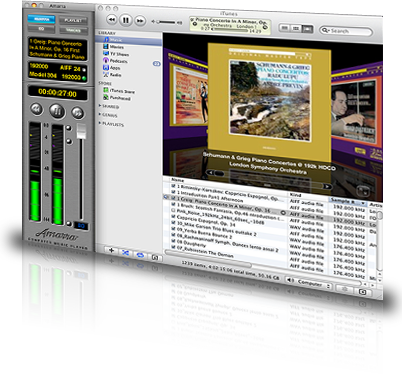
One alternative was clearly to go down the Mac path. This means I can tap on the large screen of an iPad to access all my music. The good news is that Macs do play FLAC natively now, thanks to a popular audiophile app called Amarra. The bad news: it costs US$695 – the cost of a decent DAC.

Get a PC with Media Monkey
In terms of resolution, the Squeezebox Touch only does up to 24-bit/96khz. This is already better than regular CD’s 16/44.1 and ensures that it plays high-rez 24/96 HDtracks.com downloads.

Tracks encoded in even higher 24/192 resolution are slowly being populated at HDtracks and a number of other high-rez digital download stores, so it was tempting for a while to run a Windows PC with Media Monkey or other apps like Foobar 2000 and connect direct to a DAC that supports 24/192 over synchronous USB (like Wyred4Sound’s DAC2).

I could run a “headless” Windows PC by logging in via a laptop or tablet computer via VNC, for example, or using Windows’ own remote access feature. To control the songs, Melloware has a great PC app called MonkeyTunes, which hooks up to Media Monkey and gives control to your Android phone via an app called TunesRemote+.

But that could be a project for the future. First, I’d have to convince myself I can hear the difference with 24/192, since I don’t have any tracks other than samples.

For me, it’s always more about the quality of the recording rather than just the resolution the songs are recorded at. A great CD has always been good enough, and the few 24/96 tracks I have and like were already well-recorded to begin with.

There’s another problem. With a PC running in the living room, you’re bound to get some noise, from the CPU or power supply fan.You could spend more to soundproof your PC, but that’s another topic on its own.

So, it looks like this FreeNAS/Squeezebox/Android combo is going to run for a while at home. To me, it is the best mix in terms of functionality, convenience and future-proofing. Going forward, I’m hoping for a redesigned Squeeze Commander or an iPeng app to take advantage of the big screens on upcoming Android 3.0 tablets. That would really be a blast.

Do share in the comments section below how you have set up your own music system or if you have questions setting up one.

Previous Page1234567
Razer’s proposed e-payment system seeks to shake things up in Singapore
How technology can help in a Singapore with 6.9 million people
6 technologies to watch from CES 2018
Goondu review: Razer Phone
Goondu review: Huawei P40 Pro 5G
TAGGED:androidB&WBel CantodiyFLACFreeNASGoondu DIYIntel AtomLogitechMedia MonkeyQNAPSlimserverSqueeze CommanderSqueezebox

Sign up for the TG newsletter

Never miss anything again. Get the latest news and analysis in your inbox.

By signing up, you agree to our Terms of Use and acknowledge the data practices in our Privacy Policy. You may unsubscribe at any time.
Share This Article
Facebook Whatsapp Whatsapp LinkedIn Copy Link Print
Avatar photo
ByAlfred Siew
Follow:
Alfred is a writer, speaker and media instructor who has covered the telecom, media and technology scene for more than 20 years. Previously the technology correspondent for The Straits Times, he now edits the Techgoondu.com blog and runs his own technology and media consultancy.
Previous Article Juniper attacks core networking market with Stratus QFabric
Next Article Bubblegum: Instagram-like functionality on Windows Phone 7
Leave a Comment

Leave a ReplyCancel reply

This site uses Akismet to reduce spam. Learn how your comment data is processed.

Stay Connected

FacebookLike
XFollow

Latest News

Intel Core Ultra Series 3 chips bring “real” gaming to thin and light laptops
Gaming PC
February 13, 2026
Asia-Pacific users shop with AI but trust gap slows checkout: Visa
Enterprise Internet
February 12, 2026
Sony Alpha 7 V review: Better sensor for action, stage photography
Imaging
February 11, 2026
Q&A: Heterogenous, open systems key to AI’s next big step: AMD
Enterprise
February 11, 2026

Techgoondu.com is published by Goondu Media Pte Ltd, a company registered and based in Singapore.

.

Started in June 2008 by technology journalists and ex-journalists in Singapore who share a common love for all things geeky and digital, the site now includes segments on personal computing, enterprise IT and Internet culture.


banner							
banner
Everyday DIY
PC needs fixing? Get your hands on with the latest tech tips
READ ON

banner							
banner
Leaders Q&A
What tomorrow looks like to those at the leading edge today
FIND OUT

banner							
banner
Advertise with us
Discover unique access and impact with TG custom content
SHOW ME


POWERED BY READYSPACE
The Techgoondu website is powered by and managed by Readyspace Web Hosting.

TechgoonduTechgoondu
© 2026 Goondu Media Pte Ltd. All Rights Reserved | Privacy | Terms of Use | Advertise | About Us | Contact
Follow Us!
Never miss anything again. Get the latest news and analysis in your inbox.

Zero spam, Unsubscribe at any time.
 

Loading Comments...
 

    Welcome Back!

    Sign in to your account

    Username or Email Address
    Password

    Lost your password?